Author: Tian Jiaoling
Preparation work
The doc is applied for deploying the target board with Estuary OS by USB disk or upgrading any release version of Estuary OS by USB disk.
We will introduce two methods to make USB install disk, one is to make during building Estuary open souce code, the other is making install disk with a script name mkdeploydisk.sh.
Please prepare a USB disk with 32G capacity.
Prepare a ubuntu pc.
Download and build Estuary souce code: http://open-estuary.org/getting-started/
Make USB installation disk(option 1)
Please download Estuary source code on your local pc firstly, and connect a USB disk to your local pc.
Modify
estuarycfg.jsonlocated inopen-estuary/estuary. Make sure the platform(D05), distros(CentOS or other distributions) are filled with “yes”.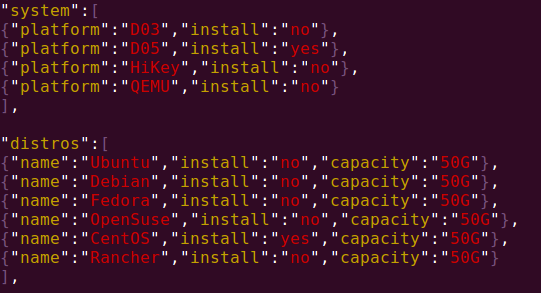
Change the value of “install” to “yes” in object “setup” for usb and the value “device” to your USB install disk.
Note: if the specified usb device does not exist, the first detected usb device will be selected by default.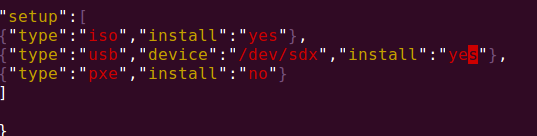
Use build.sh to create the usb install disk.
e.g.:1sudo ./estuary/build.sh -f estuary/estuarycfg.jsonThe USB disk is ok when the building finished.
Make USB installation disk(option 2)
“Curl” is suggested to install on your pc (Ubuntu system is suggested to use ). To see whether “curl” has been installed by command “which curl”. If curl is not installed, type sudo apt-get install curl command to install.
Download mkdeploydisk.sh
Connect usb disk to the your local pc, open an terminal, type the following command to download mkdeploydisk.sh
1wget -c https://github.com/open-estuary/estuary/blob/master/deploy/mkdeploydisk.shExecute the following command with sudo permission to make usb installation disk.
Please specify your disk with
--target=/dev/sdxwhen more than one USB disk connected to your computer. If not specified, the first detected usb device will be used.1sudo ./mkdeploydisk.shor
1sudo ./mkdeploydisk.sh --target=/dev/sdbWe offered multiple Estuary versions for you to choose. Please select the version in your need.
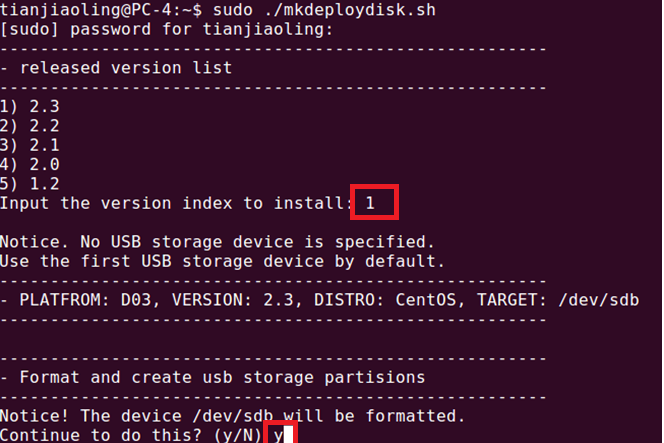
Wait until the installation is finished.
Use USB installation disk to deploy D05
Connect the usb installation disk to the usb port of D05
Reboot the board, press any key except “enter” key to enter UEFI menu when the screen echo Press any other key in 10 seconds to stop automatically booting
Select “Boot Manager”and press “enter” key , then choose “EFI USB DEVICE” and type “enter” key
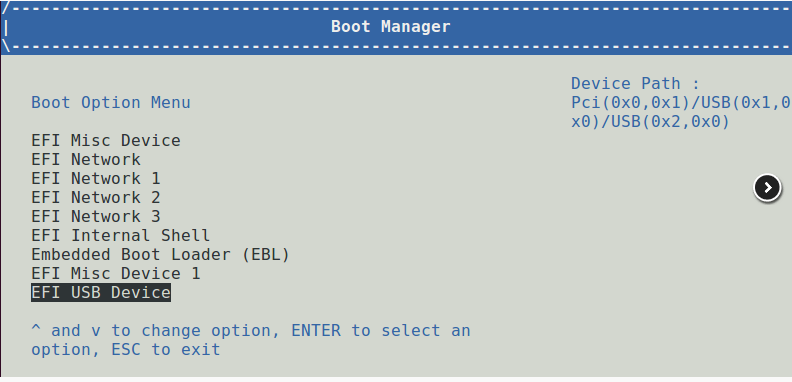
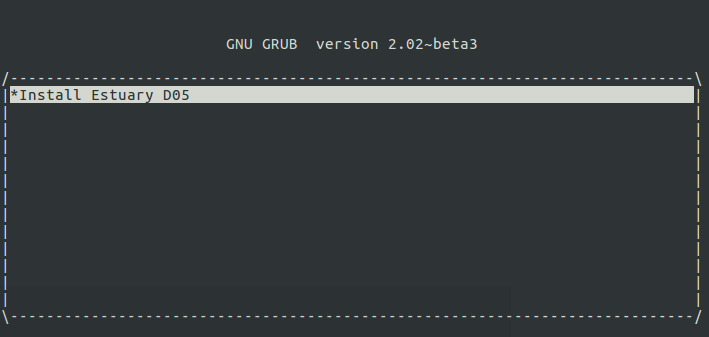
The system will enter grub menu as follow and show “Install D05 estuary”, press “enter” key to start install.
The usb installation disk is deploying the system if you see the following log.
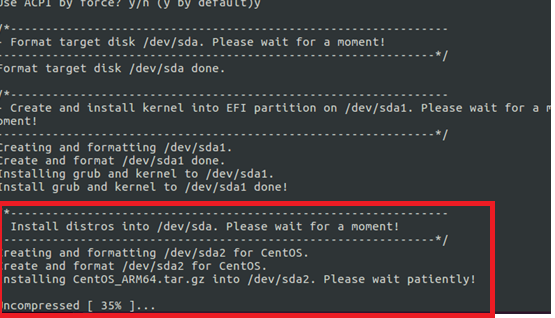
After all the deployments have done, the system will reboot and enter the Estuary OS automatically without any manual operations.